Free SSMS Extension
DELETE FROM orders Blocked 47,293 rows saved

One wrong query.
Goodbye, production.

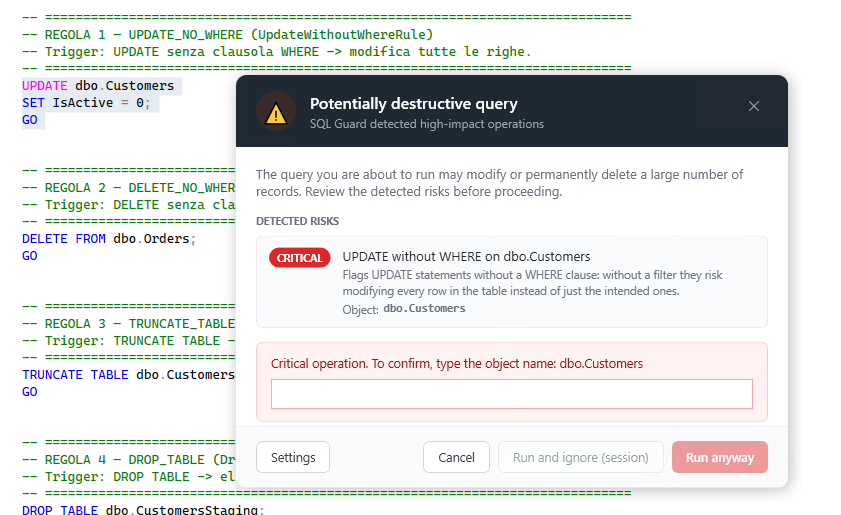
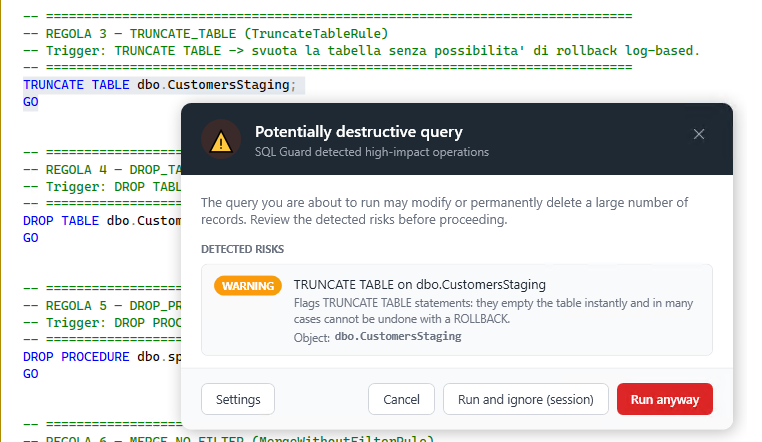
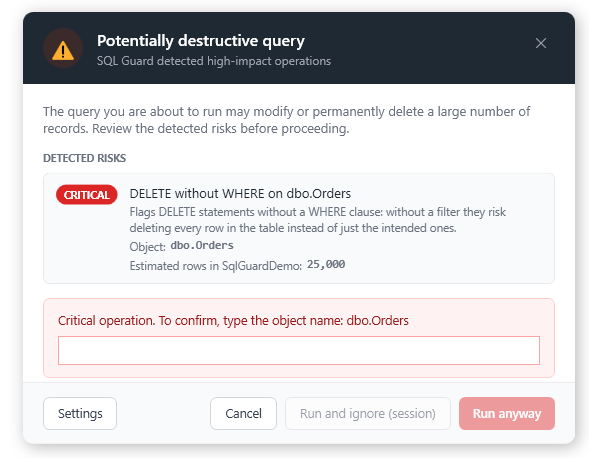
SQL Guard intercepts destructive SQL commands inside SSMS the moment you press F5 — before any damage is done. DELETE without WHERE, TRUNCATE, DROP — stopped in real time.

SSMS 18 – 22 Windows Zero config No data collected
SQLQuery1.sql — Microsoft SQL Server Management Studio
-- production (PROD-SQL-01\MSSQLSERVER)
|
⚠  SQL Guard — Dangerous Query Detected
This will affect .
9
Destructive patterns intercepted
200+
Developers protected
100%
Free plan — no limits
0
Queries sent anywhere

I ran a DELETE without WHERE thinking I was on staging. I wasn't. Six hours of recovery from backup. SQL Guard is now the first thing I install on any machine I work on.

👨‍💻
Marco R.
Senior Backend Developer

It caught a TRUNCATE I was about to run on the wrong database. One dialog, one click Cancel. That was 3 months of audit logs I didn't lose.

👩‍💻
Luca M.
Data Engineer
Without SQL Guard

Every developer has been here.

One moment of inattention. One missing WHERE clause. Recovering a production database takes an average of 4+ hours — and only if you have recent backups.

DELETE FROM orders
No filter. No warning. No undo.
Every order record in your production database, wiped in milliseconds. The transaction log is your only hope — if you have one.
47,293 rows gone
UPDATE users SET role = 'admin'
Every user is now an administrator.
Meant to promote one account. Forgot the WHERE. 1.2 million users with admin rights until someone notices.
Privilege escalation
TRUNCATE TABLE audit_log
Compliance logs. Gone.
GDPR audit trail, security events, forensic data — all cleared. Irreversible. TRUNCATE doesn't log individual rows.
Irreversible
How It Works

Installed in 2 minutes. Works silently forever.

SQL Guard hooks directly into SSMS. No separate app, no background process, no network calls.

1
Install the extension
Run the installer. SQL Guard registers itself with all your SSMS versions (18–22) automatically.
2
Write SQL normally
Nothing changes in your workflow. Write, test, and run queries exactly as you always have.
3
Press F5
If a dangerous pattern is detected, execution pauses and you see exactly what would have happened before confirming.
Ready to protect your queries?
Installed in 2 minutes. Works on SSMS 18–22. Zero configuration.
⬇ Free Download
What It Catches

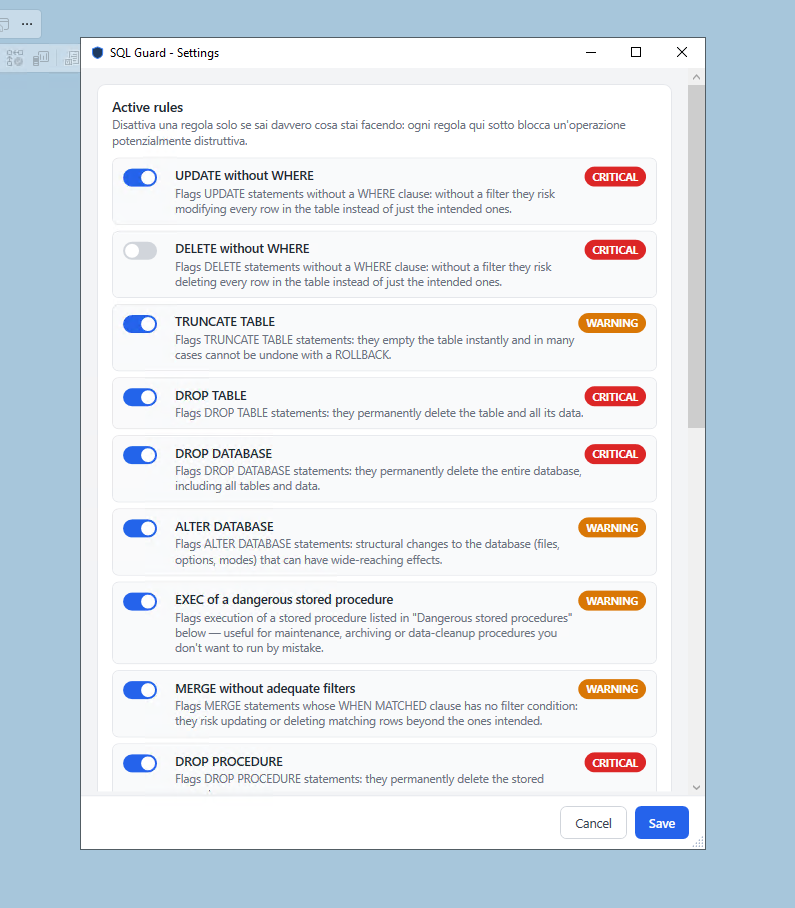
9 rules. All the classics.

Every pattern that has caused a real production incident, monitored by default.

🗑 DELETE without WHERE High
✏️ UPDATE without WHERE High
⚡ TRUNCATE TABLE High
💣 DROP TABLE High
☠️ DROP DATABASE High
🔑 DROP INDEX High
⚙️ ALTER DATABASE Medium
⚠️ Dangerous EXEC Medium
🔀 MERGE without filter Medium
About

Built by a developer, for developers.

Manuel Enzo
Manuel Enzo
Backend Developer · Italy
Backend Developer with over 3 years of experience building enterprise software in .NET and SQL Server. I built SQL Guard after watching a colleague accidentally truncate a production table — the kind of incident that doesn't need to happen. It's the tool I wish existed when I started working with SSMS daily.
FAQ

Common questions.

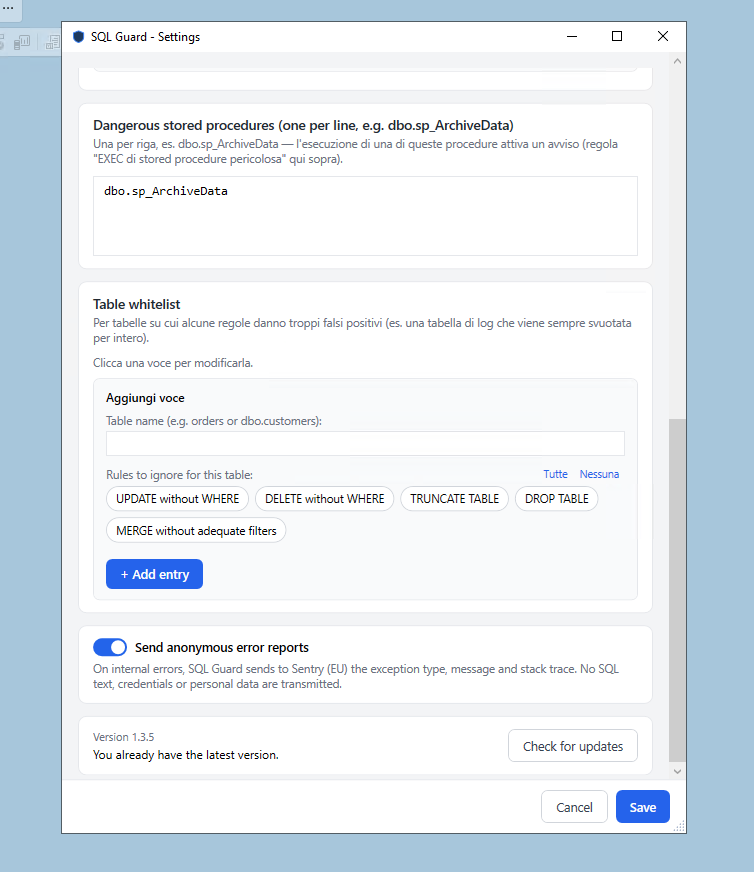
No. SQL Guard inspects queries locally inside the SSMS process. No query text, no connection strings, no database names ever leave your machine. The optional anonymous error reporting (Sentry) only sends crash stack traces — never query content.
Yes. SQL Guard shows a warning and waits for your decision. You can cancel the query or choose "Run Anyway" — you're always in control. The goal is to make the action conscious, not to block it entirely.
SQL Guard supports SSMS 18, 19, 20, 21, and 22. The installer automatically detects and registers with all installed versions. No manual configuration needed.
No measurable impact. The rule engine is a simple pattern-matching pass over the query text — it runs in under a millisecond. You'll never notice it on normal queries.
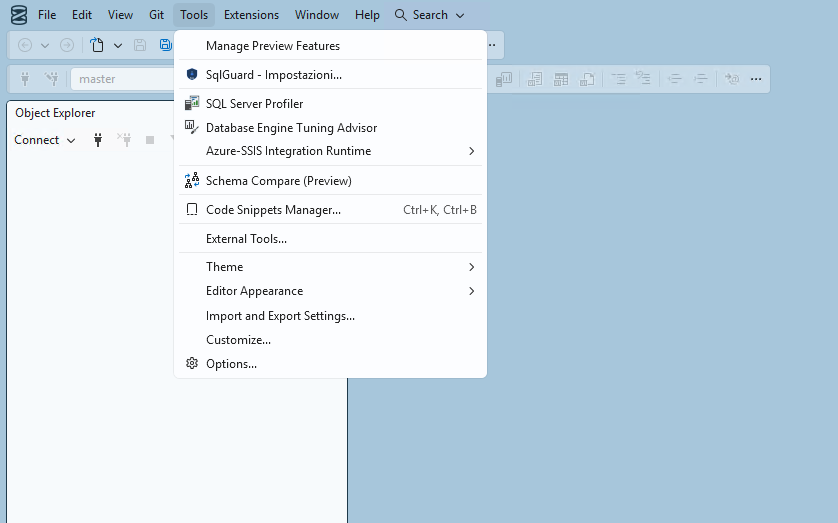
Yes. Open Tools → SQL Guard – Settings and uncheck "Enable SQL Guard". The change takes effect immediately. You can also toggle individual rules to match your workflow.
Yes. SQL Guard is a free plan — all 9 rules, all SSMS versions, no usage limits, no trial period. I built it to solve a real problem and I'm sharing it freely.

Stop the next accidental DELETE.

Enter your email and get the installer. Takes 2 minutes. Works immediately.

⬇ Download SqlGuardSetup-1.0.0.exe
Windows · SSMS 19–21 · 6 MB · Free forever